
Audio Plugins, Reviews
FabFilter Pro-C 3 Review – Is It a Real Upgrade From Pro-C 2?

FabFilter officially released FabFilter Pro-C 3, and this is one of those updates that immediately makes you stop, load a session, and rethink how you approach audio compression. As an audio engineer who has relied on Pro-C 2 for years in mixing, mastering, and sound design contexts, I do not see this release as a cosmetic refresh or a feature checklist update. Pro-C 3 represents a clear shift in how a modern dynamics processor should behave in 2026 and beyond.
Compression remains one of the most decisive processes in audio production. You use it to control peaks, shape envelopes, glue buses, stabilize vocals, manage dialog, and introduce groove.
The question you should ask yourself now is simple: Does your current compressor adapt to modern workflows, immersive formats, inconsistent source material, and hybrid creative dynamics, or does it still force you into old habits?
Pro-C 3 answers that question decisively…
Looking Back: What Pro-C 2 Did Exceptionally Well
Before discussing what changed, it is important to recognize why FabFilter Pro-C 2 became a studio standard.
Pro-C 2 offered eight compression styles covering clean digital control, drum bus glue, aggressive pumping, and character-driven compression. It introduced visual clarity through its real-time level display, flexible knee behavior, lookahead, range limiting, and a side-chain EQ that already stood above most competitors.
For many engineers, Pro-C 2 replaced several dedicated compressors because it adapted easily to vocals, drums, bass, buses, and even light mastering duties.
However, Pro-C 2 still worked primarily as a downward compressor with stylistic variations. It assumed relatively stable input levels, stereo or basic surround use, and traditional trigger behavior. As production workflows evolved, these assumptions started to feel limiting.
What Pro-C 3 Changes at a Fundamental Level

FabFilter Pro-C 3 does not merely expand on Pro-C 2. It redefines the scope of what a single compressor instance can handle.
You now get 14 compression styles, grouped into Modern, Classic, and Utility categories, including six entirely new algorithms. These additions do not just sound different. They address use cases that previously required multiple processors, automation, or parallel routing.
Upward compression, combined upward and downward dynamics, tempo-synchronized triggering, MIDI triggering, advanced side-chain shaping based on Pro-Q curves, and immersive surround processing up to 9.1.6 place Pro-C 3 firmly in a new category.
This is no longer only a compressor. It is a full dynamics control system.
New Compression Styles That Actually Matter
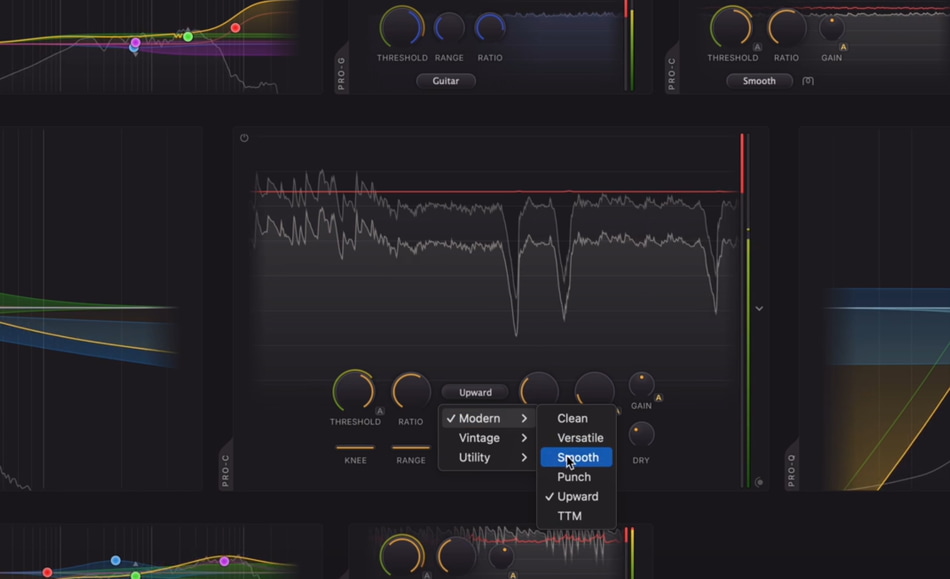
The six new algorithms introduced in Pro-C 3 are not marketing fillers. Each one targets a specific real-world problem.
Upward compression changes how you handle low-level detail. Instead of pushing transients down, you lift quiet material in a controlled way. This is extremely effective on dialog, ambient recordings, room mics, and vocals that lose presence in dense arrangements.
TTM introduces combined upward and downward dynamics, allowing you to shape dynamic range from both directions in a single instance. This reduces the need for parallel chains and keeps phase coherence intact.
Op-El and Vari-Mu bring more refined program-dependent behavior. These styles respond musically rather than mathematically, which becomes obvious on mix buses, drum buses, and mastering chains where subtlety matters more than speed.
Versatile and Smooth fill the gap between transparency and character, adapting easily to modern pop, hip-hop, electronic, and hybrid productions.
Ask yourself this: how often do you stack compressors to achieve control and feel at the same time? Pro-C 3 significantly reduces that need.
Auto Threshold and Inconsistent Sources
One of the most practical additions in Pro-C 3 is Auto Threshold. Instead of reacting strictly to input level, the compressor adapts its threshold behavior automatically.
This matters more than it might seem…
Dialog editing, podcasts, live recordings, streamed content, and modern vocal performances often come with unpredictable level changes. In Pro-C 2, you either automated the threshold or accepted uneven compression. Pro-C 3 removes that compromise.
You focus on character, timing, and range, while the compressor maintains consistent behavior. This feature alone positions Pro-C 3 as a strong choice for post-production, broadcast, and spoken-word content.
Side-Chain EQ Evolves Into a Precision Tool

Pro-C 2 already offered a capable side-chain EQ. Pro-C 3 elevates it by borrowing directly from the Pro-Q ecosystem.
You now shape the detector signal using familiar Pro-Q curves, including all-pass filters, steep slopes up to 96 dB per octave, and brickwall high-pass or low-pass options. This lets you define exactly what the compressor reacts to, not approximately.
Think about de-essing without a dedicated de-esser, kick-driven bass compression that ignores sub-rumble, or vocal compression that reacts only to presence bands. Pro-C 3 turns these ideas into fast, repeatable workflows.
Host Sync, MIDI Triggering, and Creative Dynamics
One of the most forward-thinking features in Pro-C 3 is Host Sync pulse triggering. The compressor can now respond rhythmically to the project tempo rather than purely to amplitude.
This opens creative territory that Pro-C 2 simply could not reach. Rhythmic pumping, tempo-locked breathing effects, and dynamic movement tied directly to groove become predictable and musical rather than accidental.
Add MIDI triggering, and you gain external control over when compression happens. You can trigger gain reduction from MIDI notes or patterns, which is invaluable in electronic music, sound design, and experimental workflows.
At this point, Pro-C 3 starts behaving less like a static processor and more like a performance-aware dynamics instrument.
Surround and Dolby Atmos Are No Longer Afterthoughts
Pro-C 3 supports immersive formats up to 9.1.6 Dolby Atmos, with detailed channel linking options for center, sides, tops, and LFE.
This is not a superficial checkbox feature. Surround linking behavior directly affects perceived stability and punch in immersive mixes. Pro-C 3 lets you define how dynamics interact across channels instead of forcing global linking that flattens spatial impact.
If you work in film, streaming platforms, or immersive music production, this capability moves Pro-C 3 from optional to essential.
Interface and Workflow Improvements That Save Time
The redesigned interface in Pro-C 3 focuses on speed and clarity. The animated level display now shows input, output, and gain reduction with optional knee visualization. You understand what the compressor is doing instantly.
The Compact view deserves special mention. When you want to work fast, it strips the interface down to essentials and behaves like a traditional hardware compressor. This is not a gimmick. It reduces decision fatigue during long mix sessions.
The new preset browser introduces tagging, metadata, favorites, and direct copy and paste of settings across instances. This matters when you manage large sessions or work under deadlines.
Oversampling and Clean Aggression
Pro-C 3 supports oversampling up to 32x, which becomes crucial when you push fast attack times, heavy ratios, or analog-style Character modes.
Character modes now include Tube, Diode, and Bright options, with adjustable Drive and pre- or post-routing. Combined with high oversampling, you can apply aggressive compression without aliasing artifacts, even on high-frequency material.
This gives you confidence when you choose sound over safety.
What I Expected From Pro-C 3, and What I Got
When FabFilter announced Pro-C 3, I expected refinements, better metering, and perhaps a few new styles. What I did not expect was a compressor that meaningfully changes how many compressors I need in a session.
Pro-C 3 replaces upward compressors, creative pumpers, utility compressors, and even some transient-focused processors. It adapts to inconsistent sources, immersive formats, tempo-based workflows, and modern hybrid production styles without forcing workarounds.
If upward compression is new to you, understanding how it differs from traditional downward compression helps explain why Pro-C 3 behaves so differently in practice.
The real question you should ask is not whether Pro-C 3 sounds good. It does. The more important question is this: does your current compression workflow still reflect how you actually work today?
Pros:
- Accurate peak and loudness metering suitable for mixing and mastering workflows
- Extremely precise side-chain control with Pro-Q style filtering
- Upward compression and combined dynamics that reduce the need for parallel routing
- Fast workflow focused on clarity, visual feedback, and efficient decision-making
- Wide range of compression styles covering transparent control and musical character
- Reliable performance in stereo, surround, and immersive audio formats
Cons:
- The depth of features may feel overwhelming if you only need basic compression
- Advanced options like upward compression and tempo triggering require time to fully understand
- Higher price compared to entry-level compressors, which may not suit casual users
Final Thoughts
FabFilter Pro-C 3 is not an incremental update. It is a statement about where dynamics processing is heading. If you mix, master, produce, edit dialog, or work in immersive formats, this release deserves your attention.
FabFilter Pro-C 3 is available now for $199, and if you rely on compression as an important part of your mixing or mastering workflow, the price makes sense. You will invest in a compressor that replaces multiple dynamics processors, adapts to modern production demands, and gives you long-term value.
FabFilter Pro-C 3: Quick Answers for Producers and Engineers
FabFilter Pro-C 3 is a high-end compressor plugin designed for modern mixing, mastering, post-production, and immersive audio workflows, offering advanced dynamics control that goes beyond traditional downward compression.
Yes. Pro-C 3 introduces upward compression, combined upward and downward dynamics, Auto Threshold behavior, tempo-based triggering, and full immersive surround support, features that Pro-C 2 does not provide.
Pro-C 3 can perform upward compression, tempo-synced gain reduction, MIDI-triggered compression, advanced Pro-Q style side-chain filtering, and immersive Dolby Atmos processing up to 9.1.6, all within a single instance.
Yes. With transparent compression styles, oversampling up to 32x, precise side-chain control, and accurate loudness metering, Pro-C 3 works reliably in mastering chains when used with restraint.
Yes. Pro-C 3 fully replaces Pro-C 2 while covering additional use cases that previously required multiple compressors or complex routing.
Affiliate disclosure: Some links on this page are affiliate links. If you make a purchase through them, we may earn a commission at no extra cost to you. Brand disclaimer: All product names, trademarks, and brands belong to their respective owners. References are for identification and informational purposes only.
Check Out My Custom Mixing Presets!
New Mixing Presets
Waves Vocal Chains
$24.99Original price was: $24.99.$19.99Current price is: $19.99.FabFilter Pro-Q4 Presets
$24.99Original price was: $24.99.$19.99Current price is: $19.99.FL Studio Vocal Mixing Presets
$19.99Original price was: $19.99.$15.99Current price is: $15.99.FL Studio Mastering Presets
$19.99Original price was: $19.99.$15.99Current price is: $15.99.You may also like to read...
5 Mixing Techniques To Add Analog Grit & Vibe To Your Mix
How To Be A Voice Actor – Recording Your Voice Sample Demo
Waves Sync Vx Review: A Real Vocalign Alternative for Vocal Alignment?
6 Important Differences Between Mixing and Mastering
Mastering at the Right Loudness for Spotify, Apple Music, YouTube, etc.
Mastering Basics: Essential EQ and Compression Tips